


Download Context Search – Powerful Right‑Click Search for Firefox
Overview
Context Search is a lightweight Firefox add‑on that expands the native “search Google for” right‑click feature into a multi‑engine powerhouse. By simply highlighting a word or phrase, right‑clicking, and choosing one of the built‑in services, users can instantly open search results in a new tab that sits quietly beneath the current page. This workflow keeps the main reading experience uninterrupted while still giving immediate access to supplemental information.
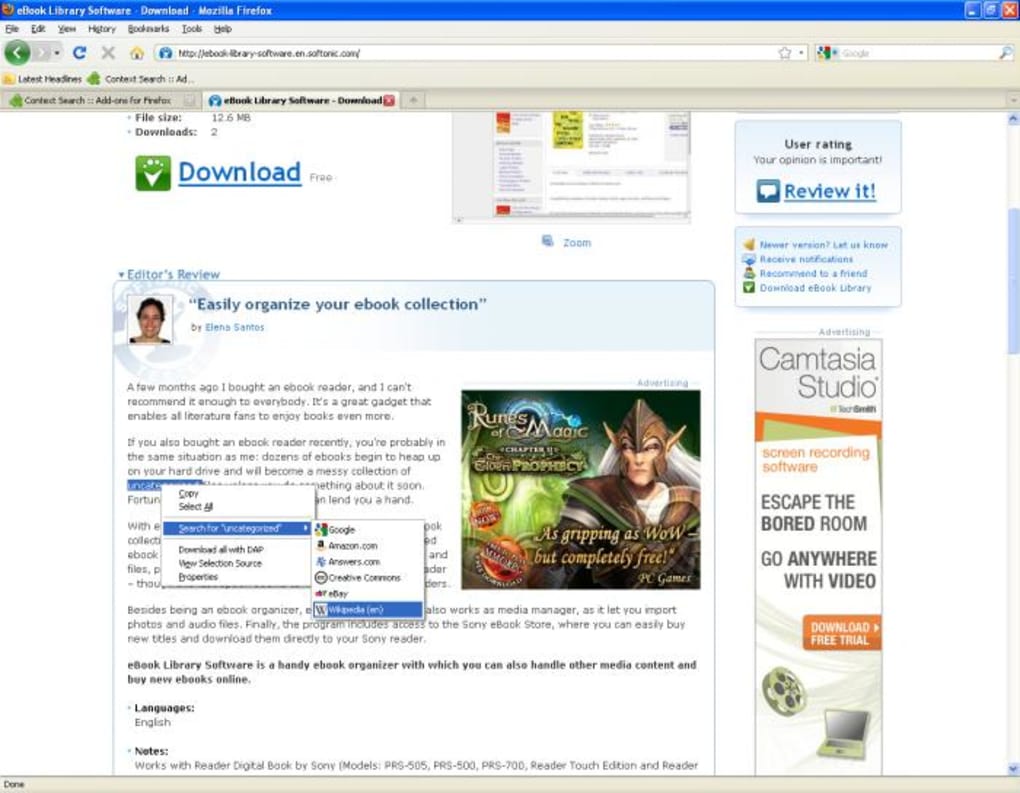
The add‑on supports six popular services out of the box: Google, Amazon.com, Answers.com, Creative Commons, eBay, and Wikipedia (en). Although the list cannot be customised from within the extension, the selection covers a broad range of everyday needs—from product price checks on Amazon to quick fact‑checking on Wikipedia. Because Context Search is written as a pure JavaScript extension, it adds virtually no overhead and does not interfere with Firefox’s performance or privacy settings.
It is ideal for students, researchers, journalists, and power users who frequently need to verify terminology, look up product details, or explore related concepts without juggling multiple tabs or windows. The add‑on’s discreet icon appears only in the context menu, preserving a clean UI while delivering a powerful, on‑demand search capability that feels native to the browser. Whether you are reading a long‑form article, browsing a forum, or comparing items on eBay, Context Search turns a simple highlight into a seamless research tool, making it an indispensable companion for anyone who values speed, convenience, and a tidy browsing environment.
Features & Installation Guide
Key Features
- Instant right‑click search for Google, Amazon, Answers.com, Creative Commons, eBay, and Wikipedia.
- Results open in a new background tab, preserving the current reading flow.
- Zero impact on browser speed; the add‑on is under 30 KB.
- Works with any Firefox version that supports WebExtensions (Firefox 57+).
- Fully open‑source code, allowing community audits for security.
- Automatic updates via Mozilla Add‑ons store, ensuring you always have the latest fixes.
Step‑by‑Step Installation
Installing Context Search is straightforward and takes less than a minute. First, open Firefox and navigate to the official Mozilla Add‑ons page for Context Search. Click the “Add to Firefox” button, then confirm the permission request in the pop‑up dialog. Firefox will download the extension package, verify its signature, and automatically add it to your browser. After installation, you’ll notice a new set of entries in the right‑click context menu whenever you select text.
To verify the add‑on is active, right‑click any highlighted word; you should see options such as “Search Google for,” “Search Amazon for,” and “Search Wikipedia for.” No additional configuration is required, but you can pin the extension to the toolbar for quick access to the options list if you prefer. Updates are handled silently in the background; Firefox checks the add‑on store daily and applies patches without user intervention, ensuring a secure and up‑to‑date experience.
Compatibility
Context Search runs on any operating system that supports the Firefox browser, including Windows 10/11, macOS 10.15+ (Catalina and later), Linux distributions, and even Firefox for Android (though the mobile version offers a reduced context‑menu due to platform limitations). Because it relies on standard WebExtension APIs, the add‑on maintains full functionality across desktop and mobile environments, providing a consistent right‑click search experience wherever Firefox is installed.
Pros and Cons
Pros
- Speed: Search results appear instantly in a background tab.
- Lightweight: Minimal memory and CPU usage; does not slow browsing.
- Multi‑engine: Access to six major services without leaving the page.
- Open source: Transparent code encourages trust and community contributions.
- Automatic updates: Keeps the extension secure and compatible with new Firefox releases.
Cons
- Fixed engine list: Users cannot add or remove search services from the add‑on settings.
- Regional relevance: Some engines (e.g., Amazon.com) may be less useful for non‑US users.
- No UI customization: The context‑menu entries cannot be renamed or reordered.
- Limited mobile experience: Android Firefox shows fewer options due to platform constraints.
- No advanced settings: Power users miss options like default engine selection or tab‑placement preferences.
FAQ & Conclusion
Is Context Search free to use?
Yes, Context Search is completely free. You can download and install it from the Mozilla Add‑ons store without any cost or hidden fees.
Can I disable specific search engines?
The current version does not offer granular control over individual engines. All six services appear in the context menu, but you can simply ignore the ones you don’t need.
Does the add‑on affect Firefox’s privacy settings?
No. Context Search only reads the selected text and opens a new tab with the chosen service’s URL. It does not track your browsing history or transmit data to third parties beyond the normal request made by the search engine.
Will it work on Firefox for Android?
Yes, but the mobile context menu is more limited. You will typically see only the most common engines (Google and Wikipedia) due to Android’s UI restrictions.
How do I report a bug or request a new search engine?
You can open an issue on the extension’s GitHub repository (linked from the add‑on page). The developer welcomes feedback and may add new engines in future releases based on community demand.
In summary, Context Search delivers a fast, unobtrusive way to extend Firefox’s native right‑click search capability. While the fixed list of engines limits customisation, the inclusion of major services like Amazon, eBay, and Wikipedia makes it a valuable tool for anyone who frequently needs to look up information without breaking their reading flow. Installation is a breeze, updates are automatic, and the add‑on respects both performance and privacy. If you spend a lot of time researching online, giving Context Search a try can shave seconds off each lookup and keep your tabs tidy. Download Context Search now and transform the way you browse the web.
Pros: Speed, lightweight, multi‑engine, open source, auto‑updates.
Cons: No custom engine list, limited mobile UI, no advanced settings.







